If you walk in “just to browse,” yongsan electronics market can drain 30 minutes before you even see the right shops. The real price gap usually isn’t the sticker—it’s warranty terms, sealed status, missing accessories, and return rules.
This guide shows a simple flow: pick one target → get 3 quotes → lock conditions on the receipt → pay confidently. Most first-timers overpay because they compare the number, not the conditions—we’ll fix that.
You’ll also get a 60–90 minute route so you can shop and still have time for food or iPark Mall.
1. Pick one item before you enter yongsan electronics market
yongsan electronics market is huge, and “window shopping” often ends in a rushed purchase without proper comparison. Your best protection is a single target item (laptop, PC parts, camera body, or lens) and a fixed checklist.
Once your goal is clear, you only need 3 shops—more than that creates fatigue, not confidence.
| Today’s target | One opening question to ask | 3 must-compare points (no exceptions) | Safe strategy for beginners |
|---|---|---|---|
| Laptop / PC | “Is this sealed, official distribution, with clear warranty?” | warranty type, included accessories, OS/license | Get 3 quotes with identical conditions |
| PC parts / build | “Can we confirm serial/official stickers and exchange rules?” | authenticity, item condition, exchange policy | Confirm compatibility before paying |
| Camera body | “Can we check shutter count and sensor condition together?” | condition, registration, return terms | Test-shot on the spot |
| Lens | “Can we check fungus/scratches and AF/aperture operation?” | optics, focus, return terms | Flashlight check + real test |
- Example script: “If the conditions are clear, I’ll pay today—please write them on the receipt.”
- Quick win: When “why is it cheaper?” has no clear answer, the missing piece is usually warranty or included items.
2. Get there easily: choose one station route and stick to it
First-timers waste time because yongsan electronics market is surrounded by similar-looking buildings and entrances. Pick one route (Yongsan Station or Sinyongsan Station) and walk straight—don’t wander and search.
For travel pacing, it’s smart to plan your return path after shopping at yongsan electronics market toward food and nearby malls (for example, iPark Mall).
| Starting point | Officially guided exits | How it feels | Beginner tip |
|---|---|---|---|
| Yongsan Station (Line 1) | Exit guidance toward electronics market area (about 10 minutes) | easiest | Follow “Electronics Market” signage—avoid drifting into iPark first |
| Sinyongsan Station (Line 4) | Exit guidance toward electronics market area (about 10 minutes) | moderate | Once above ground, choose one direction and keep walking |
| Hyochang Park Station (Line 6) | Longer walk guidance (about 15 minutes) | moderate | If you hate long walks, prefer Yongsan Station |
- Case: If you’re shopping with a friend, split “computer” vs “camera” for 20 minutes, then meet at a fixed spot.
- Example: Set a timer—after 25 minutes, you must have at least one quote photo.
3. Check hours and closure rules in 10 seconds
yongsan electronics market shopping can fail simply because the floor you needed is closed that day. ETLand’s basic hours and closures are published, but individual shops can still vary.
So treat “official hours” as your baseline, then confirm any must-visit shop by phone when possible.
| Item | Official guidance (ETLand / VISITKOREA) | What you should do in real life |
|---|---|---|
| Address | 74, Cheongpa-ro, Yongsan-gu, Seoul (서울 용산구 청파로 74) | Save it in maps before leaving |
| Hours | Weekdays 10:00–19:30 / Weekends 10:00–20:00 | Assume shop-by-shop variation |
| Closed days | 2F: 1st/3rd/5th Tuesday; 1F & 3–6F: open year-round | If visiting Tuesday, plan around 2F |
- Common fail: planning “2F only” on a closure Tuesday.
- Example: “I’m coming today—are you open and do you have Model X in stock?” saves you a wasted trip.
4. If the same model has different prices, it’s usually one of these 4 reasons
yongsan electronics market price differences are rarely “magic discounts”—they come from conditions. Beginners compare only the number; experienced buyers compare warranty, accessories, sealed status, and return rules.
If you lock these four items, you eliminate most bad deals.
| Hidden reason | Micro-question to ask | Red flag | Safe decision rule |
|---|---|---|---|
| Warranty clarity | “Is this official local warranty?” | vague or evasive answers | If unclear, pause—even if cheaper |
| Included accessories | “Is it full box with original accessories?” | missing chargers/cables | Treat missing items as added cost |
| Software/license | “Is OS/license included and documented?” | “included” but not written | Ask to write it on the receipt |
| Returns/exchange | “What happens if it’s defective today?” | verbal-only promises | Written terms beat friendly talk |
- Example: A laptop “10% cheaper” becomes more expensive if the charger is non-original or warranty is uncertain.
- Case: “Write the final conditions, and I’ll pay now” often speeds up negotiation.
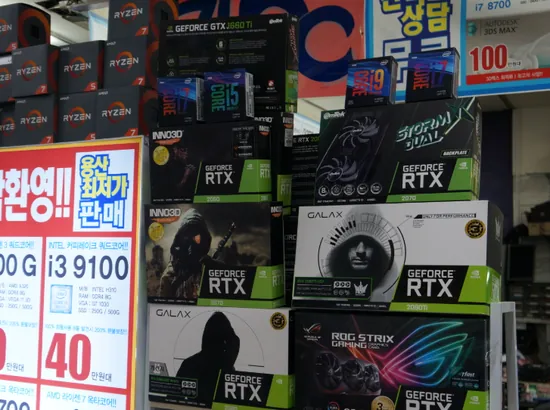
5. Computer/laptop checklist that prevents 80% of regret
In yongsan electronics market, computer purchases go wrong when the buyer skips documentation. You don’t need deep tech knowledge—just confirm identity, condition, warranty, and exchange terms.
Follow this order: spec → warranty → written terms → payment.
| Check item | How to confirm fast | Red flag | Helpful question |
|---|---|---|---|
| Specs match | open system info / label check | mismatch vs explanation | “Let’s confirm the specs on-screen.” |
| Warranty | warranty card / seller statement | unclear coverage | “Is warranty handled locally or by shop?” |
| Battery/health (laptop) | battery report / menu check | abnormal wear / swelling risk | “Can I take a screenshot?” |
| Upgrade history | RAM/SSD brand & capacity | unknown parts | “Please note upgrades on receipt.” |
| Exchange terms | receipt memo | “no returns” with no test | “Defect exchange—write the rule here.” |
- Example routine: verify specs → confirm warranty → document exchange rule → pay.
- Case: If they refuse to document anything, it’s often safer to walk away.
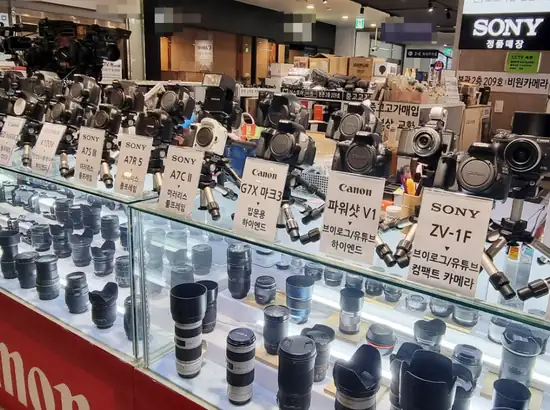
6. Camera & lens checklist at yongsan electronics market: condition beats price
In yongsan electronics market, cameras and lenses can look fine while hiding costly issues. A 10-minute test prevents “I discovered it at home” disasters.
Focus on shutter count, sensor condition, optics clarity, and AF/aperture operation.
| Check item | On-the-spot test | Red flag | Simple question |
|---|---|---|---|
| Shutter count (body) | menu/app check | heavy wear vs claim | “Can we confirm shutter count together?” |
| Sensor condition | test shot on bright background | fixed spots/marks | “One quick test shot, please.” |
| Lens fungus/scratches | flashlight through lens | haze/fungus pattern | “Can we check optics with light?” |
| AF/aperture | focus + aperture changes | noise/lag/failure | “Let’s test AF and aperture.” |
| Authenticity/warranty | serial + registration possibility | uncertain origin | “Is registration possible?” |
- Example: Lens issues are the most expensive surprises—optics check is never wasted time.
- Case: If the seller gets defensive about a simple test, choose a different shop.
7. Price comparison at yongsan electronics market: win with 3 quotes
yongsan electronics market bargaining works best when you show you’re ready to buy today—under clear conditions. Keep your conditions identical across shops, then compare the final price fairly.
Three quotes are enough; more creates confusion and slows the decision.
| Step | What you do | What you say (short) | Mistake to avoid |
|---|---|---|---|
| 1 | standardize conditions | “Same conditions, then we compare.” | comparing different warranties |
| 2 | collect 3 quotes | “Best final price for these terms?” | relying on memory—take photos |
| 3 | choose best “conditions + price” | “I’ll pay now if we write terms.” | chasing the lowest number only |
| 4 | confirm extras last | “Any included accessories?” | overvaluing freebies vs warranty |
- Example: “If you match this price under the same warranty, I’ll pay here now.”
- Case: The “lowest price” often has the strictest exchange rule—beginners should prioritize clarity.
8. Tax refund, payment & warranty at yongsan electronics market: check before you pay
Tax refund rules depend on eligibility and purchase conditions, so confirm before you swipe your card. Immediate tax refund also has limits, and items generally must be new/unused under refund rules.
| Topic | Key rule (VISITKOREA) | What to do at checkout |
|---|---|---|
| Eligibility baseline | purchase threshold and departure window requirements | bring passport, keep receipts |
| Item condition | new/unused goods required | avoid breaking seals/packaging |
| Immediate refund limits | per-transaction and trip limits apply | ask if “immediate refund” is supported |
| City refund counter limit | per-receipt limit exists | organize receipts by refund operator |
| ETLand refund shop example | listed refund shop info inside ETLand | confirm location and hours before going |
- Case: Many travelers miss refunds because the passport wasn’t ready at payment time.
- Example line: “Can we apply tax refund? Also, please write defect-exchange terms on the receipt.”
9. 60–90 minute route at yongsan electronics market: shop fast, decide calmly
A short plan keeps you from wandering and buying under pressure. yongsan electronics market is easiest when you use a timer: quotes first, decision second, checkout last.
Choose 60 minutes for laptops/standard items; choose 90 minutes for camera/lens testing.
| Plan | 0–30 min | 30–60 min | 60–90 min (optional) |
|---|---|---|---|
| 60-minute plan | get 2 quotes (same conditions) | get 3rd quote + decide | — |
| 90-minute plan | 2 quotes + quick item checks | condition testing + terms written | tax refund steps + purchase wrap-up |
- Example: Lens testing can easily take 10–15 minutes—90 minutes feels much safer.
- Case: If you feel tired, take a 5-minute break—fatigue causes expensive mistakes.
Final 7-line checklist for yongsan electronics market
- Pick one item to buy today
- Ask warranty/accessories/return terms first
- Collect three quote photos
- Compare only under identical conditions
- Write defect-exchange terms on the receipt
- Handle tax refund before payment (passport ready)
- Pay only after the “final conditions” are clear
“Check out other travel information”